← projectscaligrama
// project — caligrama

caligrama

A poem you can read that also draws what it's about.

caligrama — captura
01// historia

A Gift You Could Read

One day I wanted to make something for a person close to me. I thought of an image and a calligram, something I learned about in school: a poem whose letters draw the thing it talks about.

I didn't want just a pretty picture. I wanted something you could read, but that said more than the words themselves.

02// historia

Nothing Quite Fit

I looked at a few tools. Most of what I found was density-based ASCII art: it turns the image into a ramp of symbols like . : * % @ to fake shading. It looks nice, but the characters don't say anything. I wanted every letter to be part of the message, in order, with nothing but spaces outside the shape.

I built a couple of prototypes in Python with Pillow and pywhatkit. They worked, but they pulled in heavy dependencies for something that, in the end, returns a plain string.

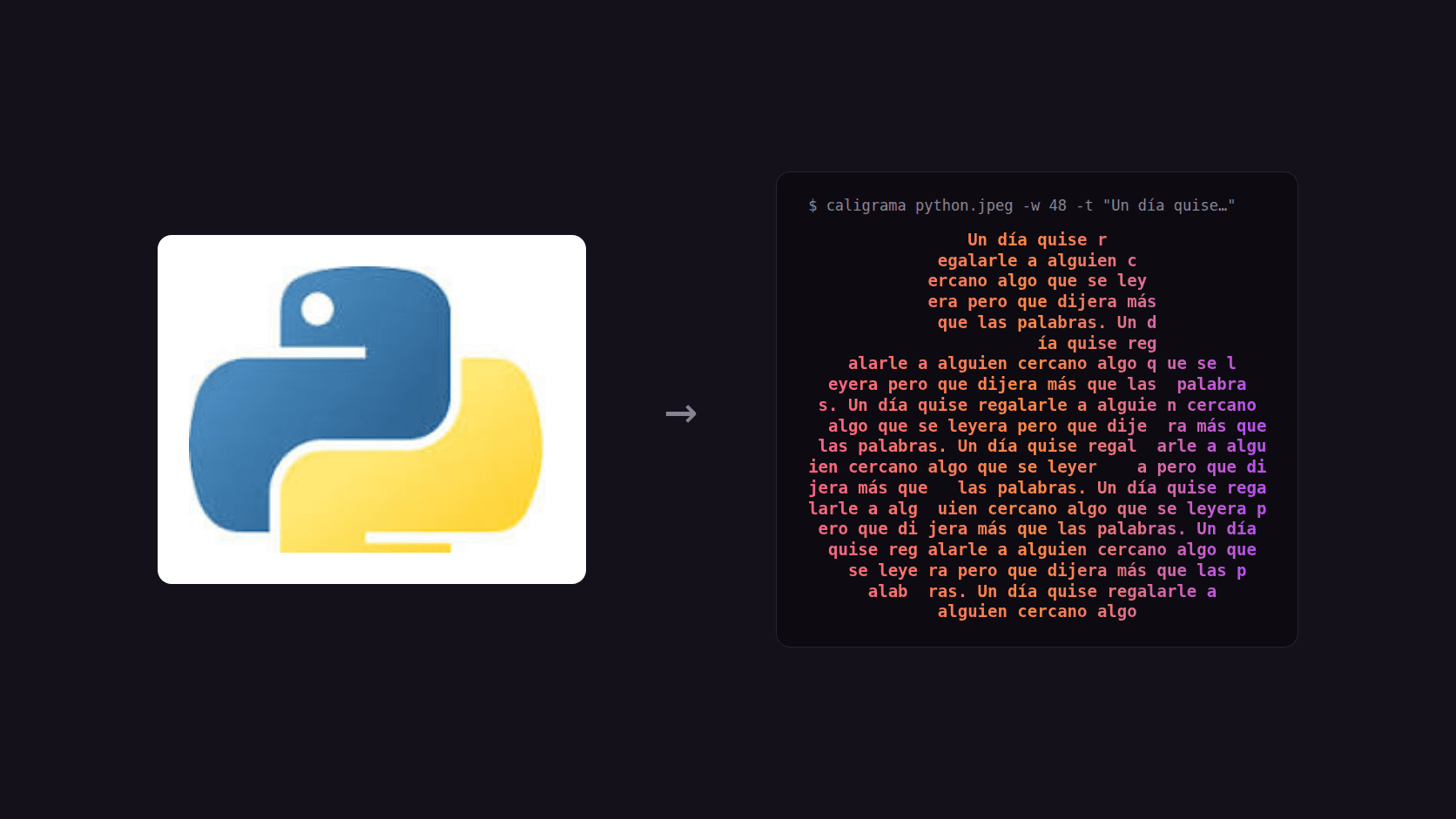
The Python logo turned into a calligram from the terminal

↳ The Python logo, and the same logo written with a sentence, from a single command.

03// decision

My First Library, in Rust. Why Not?

I'd always wanted to publish a Python library and never had an excuse. This time I did, and I made it a little harder on myself: write the whole thing in Rust, with PyO3 and maturin, leaning on AI to find my way around ground I didn't know.

The goal was to build something new that other Python programs could use locally. That's why the package has no Python dependencies: no Pillow, no numpy. Reading the image, finding the shape, and laying out the text all happen in Rust, inside a single abi3 wheel that works on Python 3.9 and up. It runs offline and sends nothing anywhere.

100% Rust
core
0
Python deps
Linux · macOS · Windows
platforms
04// arquitectura

Finding the Silhouette Without Anyone Marking It

The hard part was knowing which part of the image is the shape. If the image has transparency, I use the alpha channel. If not, I estimate the background color from the median of the border pixels and split by color distance with Otsu. Brightness alone wasn't enough: in the Python logo, the yellow is almost as light as the white background.

Then I fill the holes, but only what touches the border counts as background. That way a cat's white belly on a white background is still cat. The shape is reduced to a character grid (correcting for terminal letters being about twice as tall as they are wide), and the text is written by grapheme so accents and emoji don't get split.

Before writing the poem, you can ask the library how many letters fit and at what width the whole text fits. It helped me fit the text to the shape instead of the other way around.
05// resultado

Then Make It Move

Version 0.2.0 added animations. The text can move through the shape frame by frame, and the shape can beat. It plays in the terminal or exports as an animated SVG. The repository title and the heart on this page were generated by the library itself.

You use it from Python with import caligrama or from the terminal with the caligrama command. The CLI is Rust too. Every tag publishes wheels for Linux, macOS, and Windows to PyPI with Trusted Publishing, with no tokens stored anywhere.

The word CALIGRAMA written with the word caligrama, animated

↳ The word CALIGRAMA written with the word caligrama. Nine frames, one per letter, on a loop.

06// resultado

In the Image's Own Colors

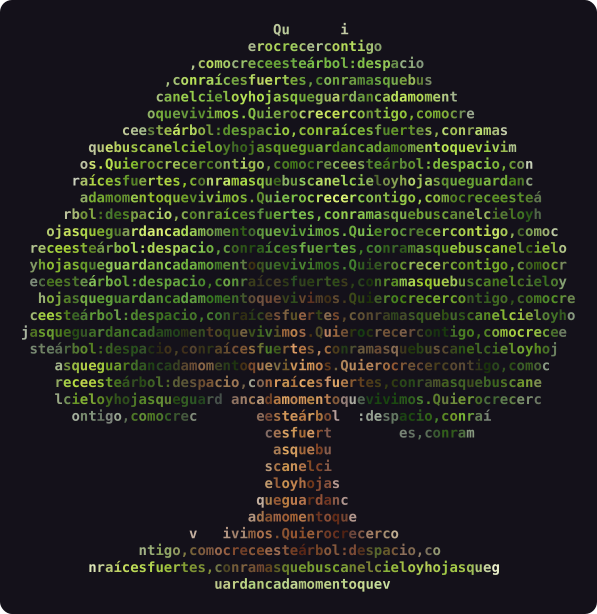
When I put it next to a hand-written rich script, I saw what it was missing: everything came out in one color, or two that I picked. In version 0.3.0 every letter takes the color the image has at that spot. The tree's crown comes out green and the trunk brown, and nobody told it where either one was.

Each letter's color is the average of the shape's pixels in its cell. It's still text: the color travels as ANSI codes inside the same str, and the SVG keeps it.

A tree written with a poem; the crown in greens and the trunk in browns

↳ A tree written with a poem. Each letter carries the image's average color in its cell.

07// resultado

Putting It to the Test

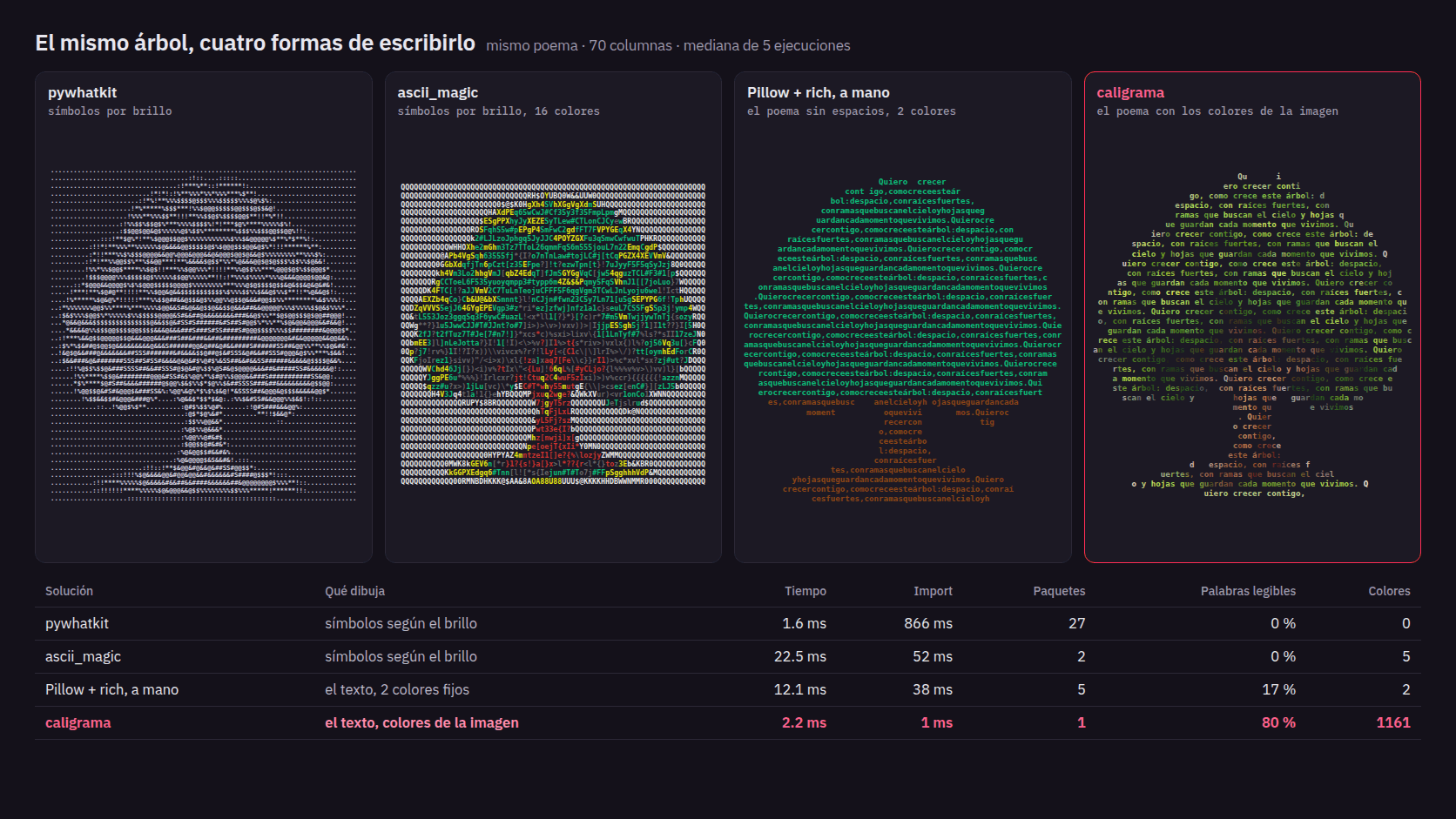
I wanted to know whether it was actually better than what already existed, so I built a benchmark: the same tree and the same poem in pywhatkit, ascii_magic, a hand-written Pillow + rich script, and caligrama. All at 70 columns.

The tools that turn brightness into symbols get the image across, but they don't write anything: 0 % readable words. The hand-written script does write the poem, but with no spaces and two fixed colors, so 17 % of it reads. caligrama keeps 80 % of the words whole, draws in about 2 ms, imports in 1 ms, and installs nothing else.

80 % vs 0–17 %
readable words
~2 ms
time per drawing
1 vs 2–27
packages installed
The same tree drawn by pywhatkit, ascii_magic, a Pillow + rich script, and caligrama, with a metrics table

↳ Same tree, same poem, 70 columns. The numbers come from bench/benchmark.py in the repository.

08// aprendizaje

A Viewer Is Not a Message

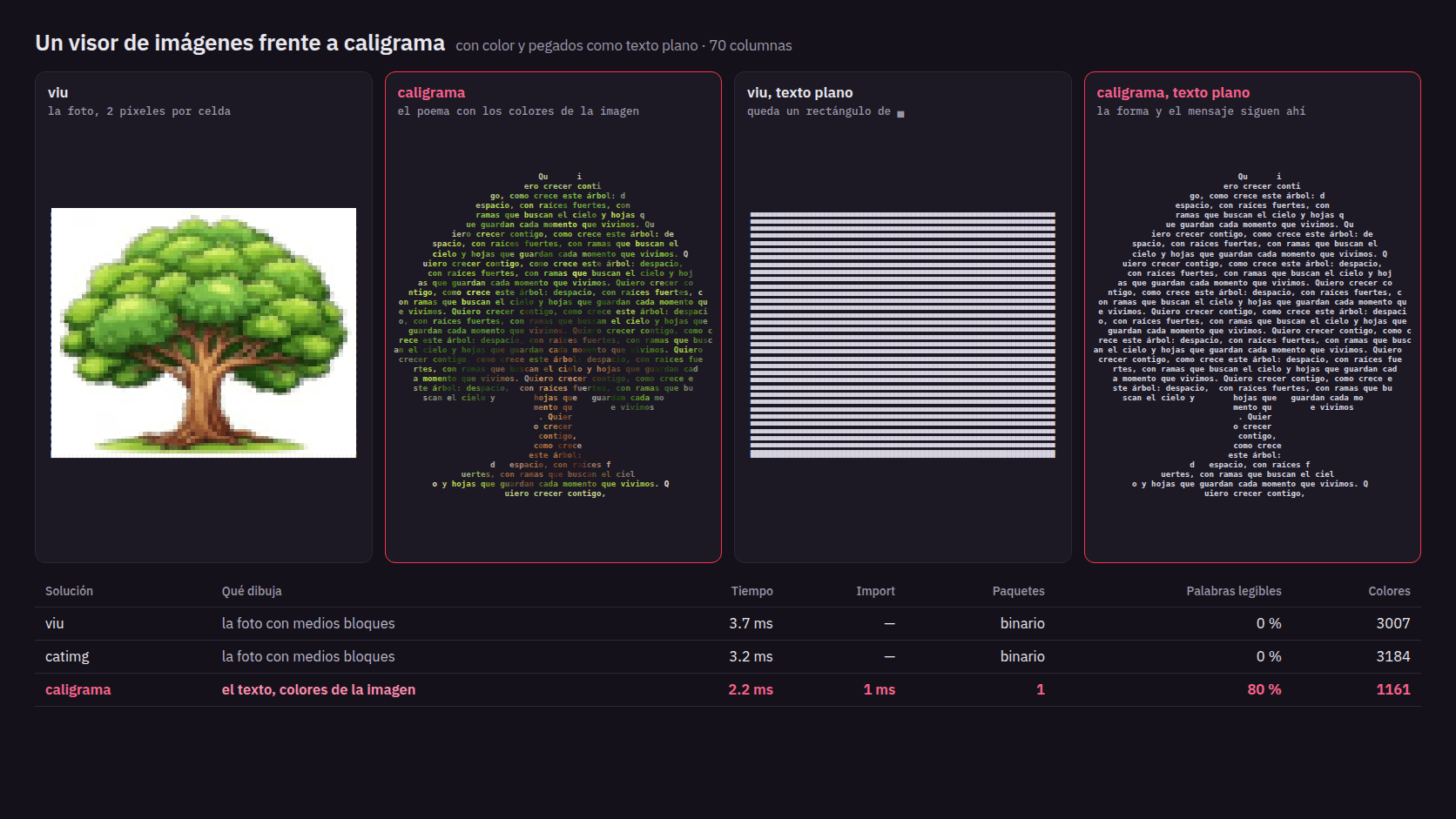
I also compared it with viu and catimg, which show photos in the terminal by painting two colored pixels per cell. I lost that one, and that's fine: they're more faithful to the image than any drawing made of letters.

The difference shows up when you copy the result and paste it somewhere without color, like a chat or a commit. From viu you get a rectangle of blocks. From caligrama you keep the shape, and the message is still there. That's what I built it for.

viu and caligrama in color, and the same output pasted as plain text, with a metrics table

↳ viu and caligrama in color, and what's left of each one pasted as plain text.

09// aprendizaje

Simple, for Now

Right now caligrama does one thing and does it well: image plus text in, shaped text out. It started as a gift and became my first package on PyPI. My plan is to keep making it more powerful than the other options out there, without losing what I like about it: one pip install and nothing else.

Built with:Rust, PyO3 (abi3), maturin, the image crate, and GitHub Actions with Trusted Publishing to PyPI.
next project
Code Arena→

Because a university programming contest should feel like a live arena, not a static form.